November 2025
With the xSuite Helix release “Ferocious Ferret”, we have enhanced and further developed various components. One of the focal points of this release was the transfer of reference locations at line item level to downstream systems (e.g., xSuite Cube).
New Functions
Migration from Archive V1 to Archive V2 in xSuite Helix
Efficient preprocessing of e-invoices adapted to electronic invoices
Additional workflow-specific information for users
Migration option in xSuite Helix – Archive V1 to V2
There is now a migration option from Archive V1 to Archive V2.
This migration is carried out on request by the xSuite operations team on the xSuite Helix platform. The actual migration process runs in the background and does not affect your day-to-day business.
After migration, the URLs for accessing the archive (e.g., the HTTP script in the ArchiveLink parameters of the archives and in the proxy settings in the xSuite Cloud Proxy) must be adjusted. The xSuite operations team will switch the customer tenant to Helix Archive V2 after receiving feedback from the customer. After that, the Archive V2 tiles will be visible in the xSuite Helix dashboard. Newly stored archive documents are migrated to the new archive as a “delta migration.”
Once the migration is complete, xSuite provides you with a complete migration log.
Specific preprocessing of electronic invoices
E-invoices (electronic invoices) already contain essential information required for the invoice verification workflow. This means that technically complex processes such as OCR or information extraction are not necessary, or only to a limited extent, depending on customer-specific requirements.
However, xSuite Helix adds master data to electronic invoices such as vendor numbers or tax codes. This is the only way to ensure that documents are correctly pre-entered in the target system without additional manual effort.
When a document is created in the xSuite Helix workflow (e.g., via eDNA), the upstream system can assign a flag (Is_eInvoice) to the document. This flag indicates that the document is an electronic invoice.
Additional workflow-specific information for users
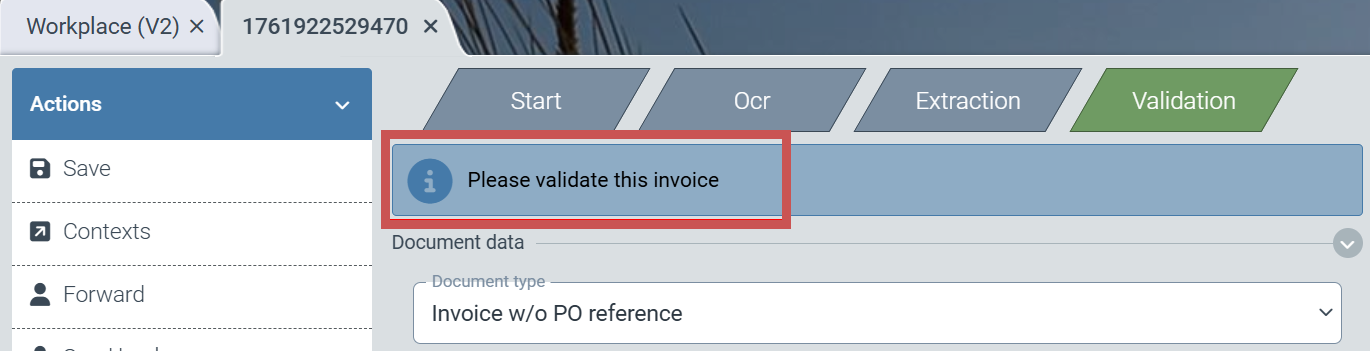
Additional information can now be displayed to the user for each workflow step. Brief instructions or notes on how to proceed with the work item are intended to make it easier for the user to complete the task. Additional notes could include, for example, Approval or Mathematical verification of amounts over 10,000 euros.
If the administrator wants to provide a note to colleagues who edit work items, they can insert localized text into the Text of task column within the role assignment table as an administrator with access to the configuration area.
 |
After opening the work item, the user sees the note in the upper part of the workspace.
 |
Changes and Enhancements
Transfer of various reference information from the extraction process to subsequent systems
Transfer of reference information to downstream systems
Using various extraction methods, xSuite Helix obtains a wide range of information about the sources of extracted text from the original document. This reference information can now be transferred together with the work item to downstream systems of xSuite Helix (e.g., xSuite Cube). The scope of reference information extends to the item level. This means that color highlighting of references at the item level is now also visible in systems outside of xSuite Helix.