UI elements in the archive overview
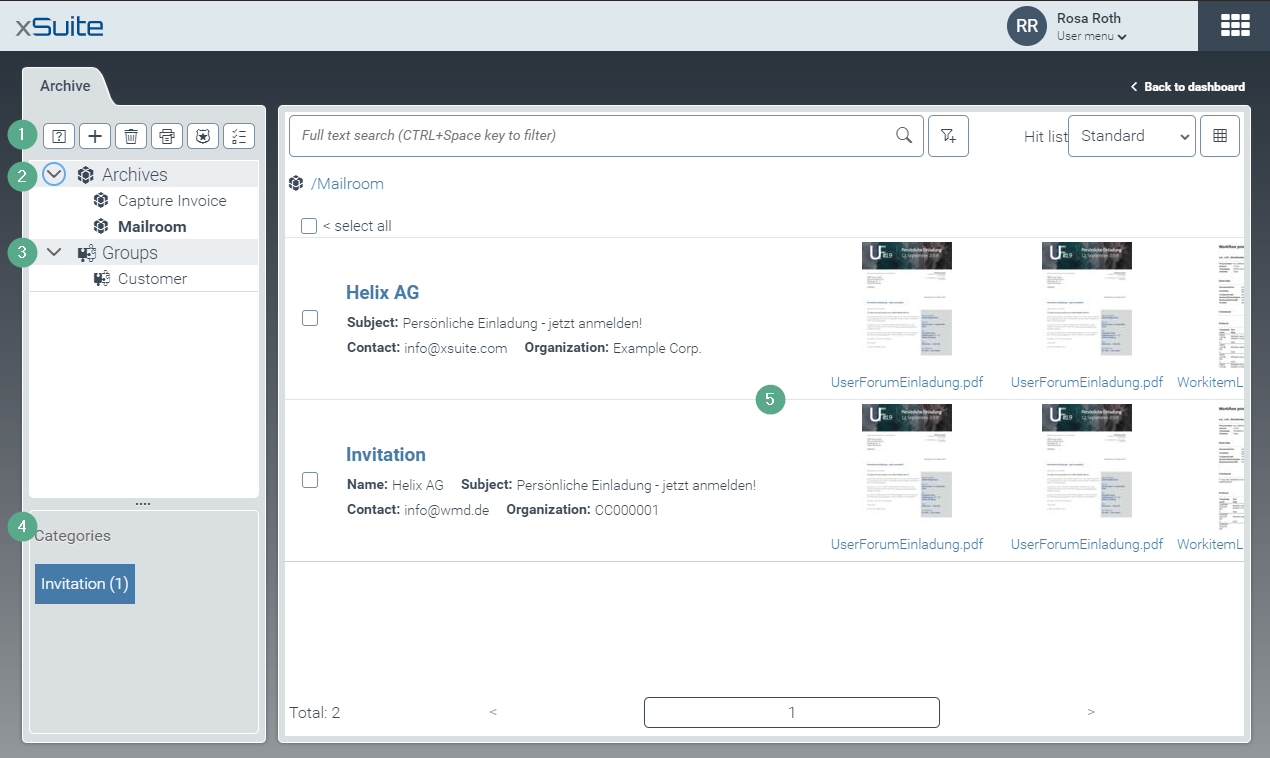
Element | More information | |
|---|---|---|
1 | Toolbar | The toolbar contains buttons for actions to be applied to a single archive or to multiple archives collectively. For more information, see Overview of archive toolbar buttons. |
2 | List of archives | All archives are displayed in this list. You can select a single archive or multiple archives. When archives have been selected, various actions can be applied. For more information, see Archive selection for actions. The archive list is managed by the xSuite Archive Helix administrator. The archive list comprises one part of the archive hierarchy, the other being the archive group. |
3 | Archive groups | An archive group is a collection of archives. You can apply various actions to an archive group. For more information, see An overview of actions you can perform in archives. Some of the actions that can be applied to archive groups cannot be applied to multiple archives selected in the archive list. For instance, you can search index fields and select a hit list layout for an archive group. Archive groups are managed by the xSuite Archive Helix administrator. |
4 | Categories | In the Categories section, you can filter the archive hit list by index field. For more information, see Filtering the archive hit list by index field. |
5 | The archive hit list | This is where you will see the archive documents from the archives you have selected. For more information, see The archive hit list. |