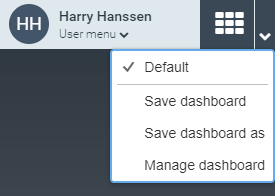
Overview of commands in the dashboard menu
Command | More information | |
|---|---|---|
A dashboard in the list of dashboards | Opens a dashboard. A check mark appears in front of the dashboard that is already open. In this example, Default is ticked.
| |
Save | Saves an open dashboard. This can only be used for private dashboards. If you try to save the default dashboard, you will receive an error message. | |
Save as | Saves an open dashboard under a different name. For more information, see Creating a private dashboard. | |
Manage Dashboard | Opens the Manage Dashboard dialog. In this dialog you can rename or delete private dashboards: For more information, see Renaming a private dashboard or Deleting a private dashboard. |