Tile groups
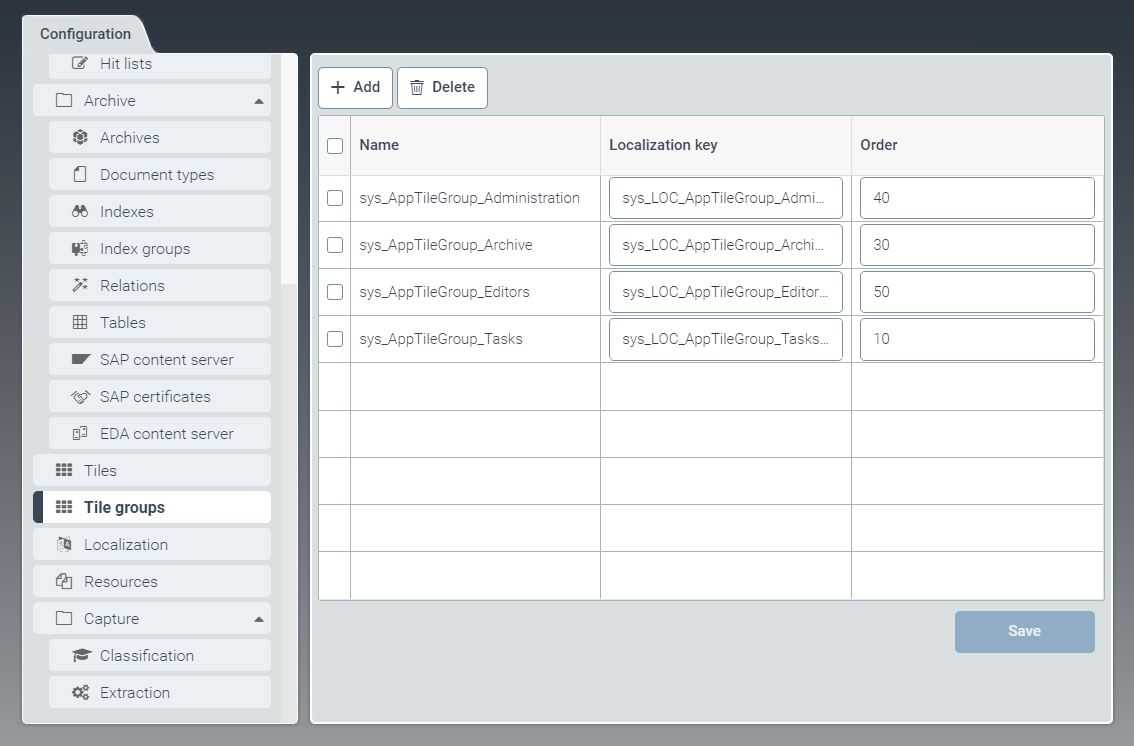 |
Tile groups are used for categorization of individual tiles by theme.
To edit existing tile groups and create new ones, go to the Tile groups tab.
Here you can set the title of a tile group and the position of the tile group in the dashboard.
Tiles are assigned to tile groups in the Tiles window.
The following tile groups are delivered as part of the standard package:
sys_AppTileGroup_Administration: Tile group for tiles of the "Administration" areasys_AppTileGroup_Archive: Tile group for tiles of the "Archive" areasys_AppTileGroup_Editors: Tile group for tiles of the "Configuration" areasys_AppTileGroup_Tasks: Tile group for tiles of the "Tasks" area
Creating a tile group
In the Tile groups window, click the button Add.
➣ The Add tile group dialog box will open.
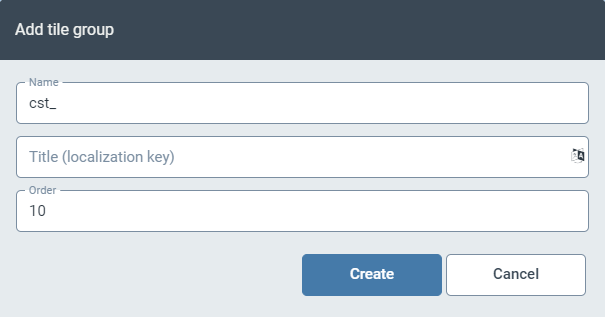
In the Name field, specify the technical name of the tile group.
The prefix
cst_is predefined and cannot be changed.In the field Title (localization key), enter a localization key.
To open the Select localization dialog box, click the
 button.
For more information, see Selecting a localization.
In the field Order, enter a number.
The number will define the position of the tile group on the dashboard. The order is ascending.
Tile groups with small numbers are located on the left side of the dashboard.
Click Create.
➤ The new tile group has now been created.