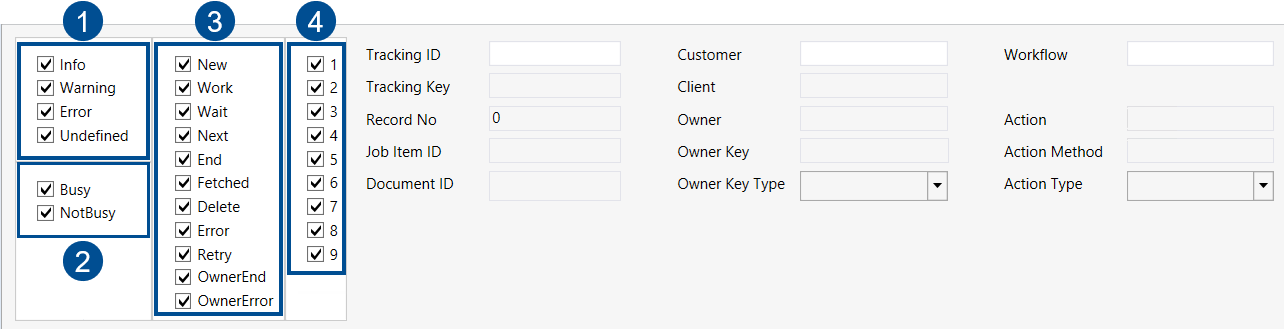
Overview of filters in the Job Item Monitor
 |
No. | Filter | Description |
|---|---|---|
1 | Status | Status of the item in the inbox (column Level in the table). |
2 | Item Activity Status | Activity status of the item in the inbox. This item indicates whether the document is busy or idle (column Busy in the table). |
3 | Item Status | Current status of the item, i.e., the processing step it is undergoing (Status column in the table). |
4 | Item Priority | Priority level of the item in the inbox (column Priority in the table). |
-- | Tracking ID | Tracking ID of the item. An alphanumeric value (UUID) generated by xSuite Interface Prism to make the document uniquely identifiable. |
-- | Tracking Key | Short numeric key for identifying the item. It is generated in xSuite Interface Prism and, in contrast to the Tracking ID, can be read by human eyes. |
-- | Record No | Identifying item number in the inbox. |
-- | Document ID | Document ID in the inbox. |
-- | Customer | Customer responsible for the item. Manage customers using the Customer Clients tab. |
-- | Client | Client responsible for the item. Manage clients using the Customer Clients tab. |
-- | Owner | Current owner of this item. |
-- | Owner Key | Key handed over by the owner of the item. |
-- | Owner Key Type | Describes the origin of the owner key. |
-- | Workflow | Workflow that was assigned to the item. |
-- | Action | Action that was assigned to the item. |
-- | Action Method | Method of the action that was assigned to the item. |
-- | Action Type | Action type that was assigned to the item. |