App Service Settings
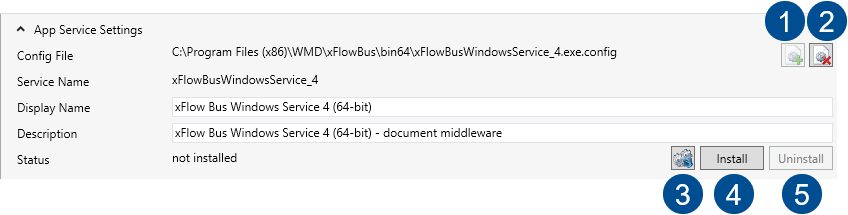
Set parameters for configuration and installation of the service in the App Service Settings section. This is where you can install and uninstall services. You can also determine where the config file of the service is to be saved and enter the name of the service.
 |
Parameter | Description | |
|---|---|---|
-- | Config File | Repository of the service config file in the file system of xSuite Bus Prism. By default, it is located in the main directory of the xSuite Bus installation. |
-- | Service Name | Unique description of the service as it has been specified in the service. |
-- | Display Name | Name of the service as displayed in the list of Windows Services. |
-- | Description | Exact description of the Windows Services in which the characteristics of the services are displayed. |
-- | Status | Indicates whether the service has already been installed. Either installed or not installed will appear. |
1 | Add Service | Allows the service to add the settings. Standard values are automatically entered based on the name of the service. If the configuration file of a service that has not yet been installed has been deleted with the Remove Service button, then it can be re-populated with new values with the Add Service button. This button is only active when the service has not been installed and the configuration file does not exist in the program directory. |
2 | Remove Service | Removes the service from the App Service Settings. All settings are removed. For a non-installed service, the configuration file can be deleted with this button. |
3 | Refresh | Refreshes the current status of the service. A check is made as to whether the service has already been installed. |
4 | Install | Installs and registers the service as Windows Service. |
5 | Uninstall | Un-installs and removes the registration of the Windows Service. |