Data Archiving
When documents are digitized, raw data and transaction data are created in xSuite Bus. A raw data document consists of the unchanged input document. A transaction data document consists of scan data of an incoming document.
Raw data and transaction data can be permanently stored in the xSuite archive via the Data Archiving action.
Notice
For archiving, the check box Salted must be activated in the xSuite archive.
The check box can be found in xSuite Archive Prism under Archive Admin → root → SystemSettings → DefaultSettings → Security.
Archiving of raw data and transaction data documents can be 1-level, 2-level or 3-level. The number of actions to be created depends on the number of archiving levels. For more information, see Archiving Steps.
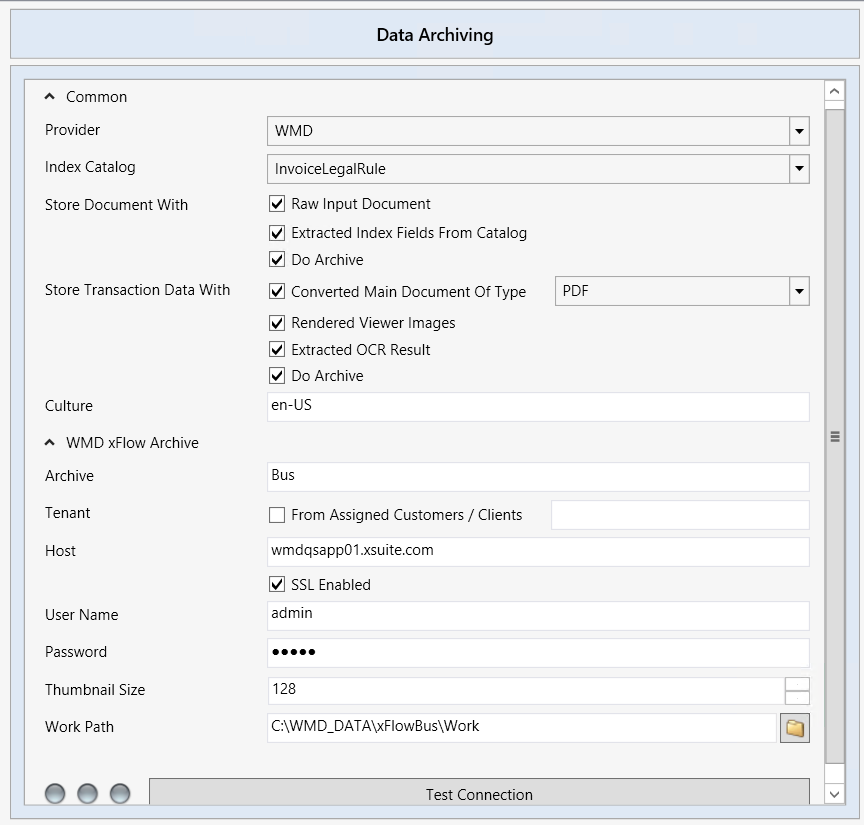
The following settings are available for configuring Data Archiving actions:
 |
Parameter | Description |
|---|---|
Provider | Specifies the archive provider. It is always |
Index Catalog | Sets the field catalog. The field values of this field catalog are attached to the raw data document under Store Document With → Extracted Index Fields From Catalog. The field values of this field catalog are attached to the OCR results of the transaction data document under Store Transaction With → Extracted OCR Result as fields for the xSuite Viewer. |
Store Document With | Controls how raw-data documents are saved in xSuite Archive.
|
Store Transaction Data With | Controls how raw-data documents are saved in xSuite Archive. The following options are available:
|
Culture | Specifies the language in which the index-field names and the format in which the index-field contents are to be displayed in the archive. Default value: |
Archive | Specifies the name of the archive. NoticeThe same archive must be defined for the storage of raw data documents and the storage of transaction data documents. If different archives are specified, it is not possible to reference the raw data document from the transaction data document. |
Tenant → From Assigned Customers / Clients | Controls whether the default tenant of xSuite Archive is to be used or whether the tenant specified in the associated field will be used. Input format: |
Host | Specifies the host name of the archive server. |
SSL Enabled | Manages whether SSL is to be used for communication with the archive server. |
User Name | Specifies the name of the login user. |
Password | Specifies the password of the login user. |
Thumbnail Size | Determines whether attachments are displayed as thumbnails in the archive, and how large they are.
|
Work Path | Sets the working directory where temporary files of the archive action are stored. |
Test Connection | Checks the connection to the archive server. |
Archiving Steps
Archiving type | Description |
|---|---|
Single-step | Raw data documents and transaction data documents are archived with their enriched data in one action. The action must be positioned in the workflow after the Document Conversion action and, depending on the selected attachments, after the Document Extraction action as well. |
Two-step | Raw data documents and transaction data documents are archived separately in 2 actions. The enriched data is archived along with each document. The actions must be positioned in the workflow after the Document Conversion action and, depending on the selected attachments, also after the Document Extraction action. |
Multi-level | Raw data documents, transaction data documents and enriched data are archived separately in multiple actions. Multi-level archiving allows, for example, the raw data to be archived at the beginning of a workflow and the field values to be added after the Document Extraction action. |