System Clean-Up
The actions to be found in System Clean-Up clean up the folder structure and all stored files managed by xSuite Bus.
The package contains a pre-set setting, ACT_System_CleanUp. It contains the clean-up of the log entries, defined directories (including the "Work" and "Backup" directory of xSuite Bus), and the entries in the Job Item Monitor for the Customers and Clients to whom the action was assigned.
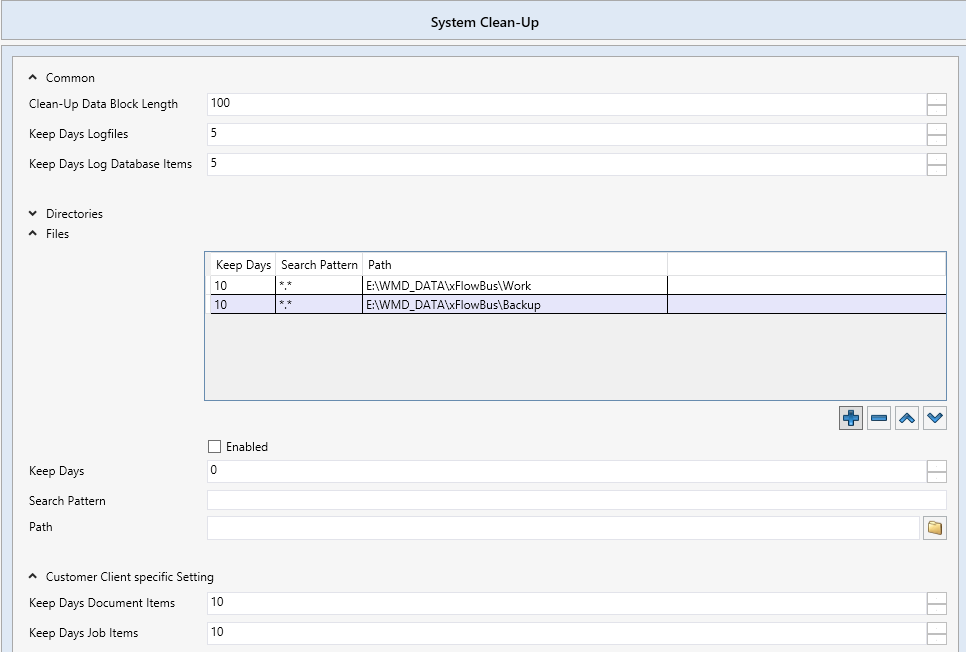 |
Parameter | Description |
|---|---|
Common | General settings for System Clean-Up. |
Clean-Up Data Block Length | The size of the block of items per cycle. Items are always processed in a block, the size of which is set here. If, for example, the number 100 has been entered, then a clean-up cycle is started once 100 items have accumulated. |
Keep Days Logfiles | Number of days that the log files are to be retained. |
Keep Days Log Database Items | Number of days that the log information is to be retained in the database. |
Directories | This is where you enter the length of time that the files are to be retained in the directories. |
Keep Days | Number of days after execution of the action All directories that are older will be deleted. |
Search Pattern | Search pattern for folder names The use of wildcards, e.g., All folders matching the search pattern will be deleted. |
Path | Path specifying the subdirectories to be deleted The parent directory specified here will not be deleted. |
Enabled | Controls whether monitoring of the previously configured folders is active. If this check box is disabled, no deletion will take place. |
Content Only | Controls whether only the contents of the directories are deleted, not the directories themselves. If this check box is unchecked, the directories and their contents will be deleted. |
Files | Files to be deleted after the defined days have elapsed. |
Keep Days | Sets the retention period of the files in days. |
Search Pattern | Files that are to be deleted after the defined number of days. Specify *.* to select all files. |
Path | Path containing the files to be deleted. |
Enabled | Checkmark to activate monitoring for the files configured. |
Customer Client specific Setting | Here, you can delete items by customer and/or client. Any entries made here will apply only to those customers and clients to which the action has been assigned. |
Keep Days Document Items | Number of days for which documents will be retained for the customer and/or client. |
Keep Days Job Items | Number of days for which logs will be retained for the customer and/or client. |
Notice
The settings in the Customer Client specific Setting section only affect the customers/clients that are activated for the action.
Selecting the customers/client Any normally has the effect that all customers/clients are selected. In this particular case, customers/clients must be activated individually so that the Customer client specific Setting is effective.