Windows Service Actions
In this section of the xSuite Bus Management Studio, the status of the installed xSuite Bus Windows Services can be displayed. Services can also be started, restarted and stopped, either individually or en masse.
To restart, the xSuite Bus Service Watcher should be stopped. The Service Watcher can also be stopped or started with this tool.
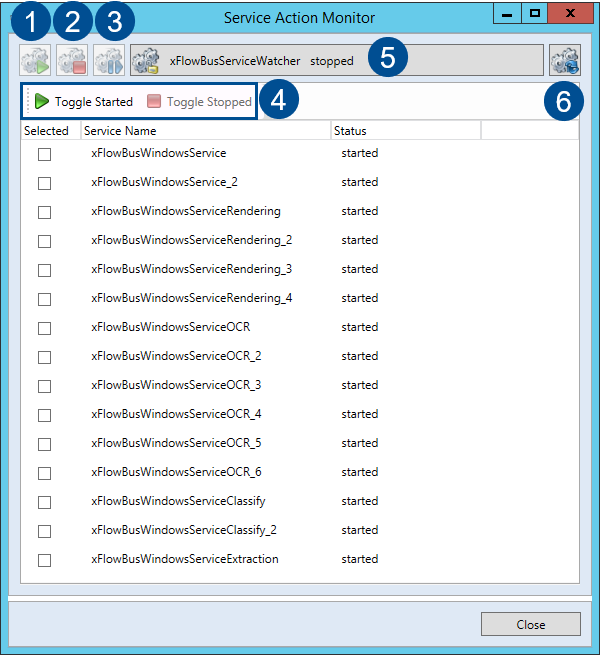 |
No. | Parameter | Description |
|---|---|---|
1 | Launch Service | Starts up the selected services. If they are already running, no action will be performed. |
2 | Stop Service | Stops the selected services. If they have already been stopped, no action will be performed. |
3 | Restart Service | Restarts the selected service. The service will automatically be stopped and restarted. |
4 | Toggle Started and Toggle Stopped |
|
5 | xSuite Bus Service Watcher start/stop | Stops or starts the xSuite Bus Service Watcher. |
6 | Refresh | Refreshes the status of all installed services. Once the button has been activated, a check is performed as to which xSuite Bus service is installed and what its status is. The status of the xSuite Bus Service Watcher is also checked and updated. |