Search options for the index-field search
The following search options are available for an index-field search:
Search option | Purpose | Sample search terms | Sample search results |
|---|---|---|---|
Simple search | For finding entries that contain at least one of the words above. The space between the search terms corresponds to the | Invoice OR delivery | Will show: Invoice is correct. Delivery is correct. Invoice and delivery are correct. |
Will not show: Invoices are correct. | |||
Invoice correct | Will show: Invoice correct. Invoice is correct. Delivery is correct. | ||
Will not show: Invoices are correct. Correct invoices | |||
Phrase search | For finding an exact group of words. Regarding the syntax: Put the group of words in quotation marks ("..."). | "Invoice correct" | Will show: Invoice correct. |
Will not show: Invoices correct. Invoice is correct. | |||
"From" search | For finding a specific number or date value Number and date fields consist of a "From" field and a "To" field. If you are looking for a specific value, enter the value in the "From" field and leave the "To" field empty. | From: 110 | Will show: Documents with a value of 110 or higher. |
"From-to" search | For searching a range of numerical values or dates. Number and date fields consist of a "From" field and a "To" field. If you are searching for a value range, enter a value in the "From" and "To" fields. | From: 31/12/2024 To: 01/04/2025 | Will show: Documents with a date between 31 December, 2024 and 1 April, 2025. |
Fuzzy search | For finding entries that contain words similar to the words mentioned. | Suppliers | Did you mean: Supplies? |
corretc | Did you mean: correct? | ||
Placeholder search | For finding words or word groups that you only partially know. Regarding the syntax:
| Ma*er | Will show: Maler, maker, master, matter, Mailer |
Will not show: Material | |||
Ma?er | Will show: Maler, maker | ||
Will not show: Material, master | |||
Soundex search | For finding words that sound similar to the entry. | sail~ | Will show: Fail, mail, sale, sell |
Executing an index-field search
An index-field search can be used to search for documents according to index-field values. An index-field search is comparable to an advanced search in internet search engines.
In a single archive or in an archive group, you can combine the index field search with a full-text search, linking the search terms with AND. Only the documents that match all search terms will be found.
Open the Archive section.
In the sidebar, click on the name of an archive.
➣ The documents in the archive will appear in the hit list.
Click on
 Minimize/maximize filter.
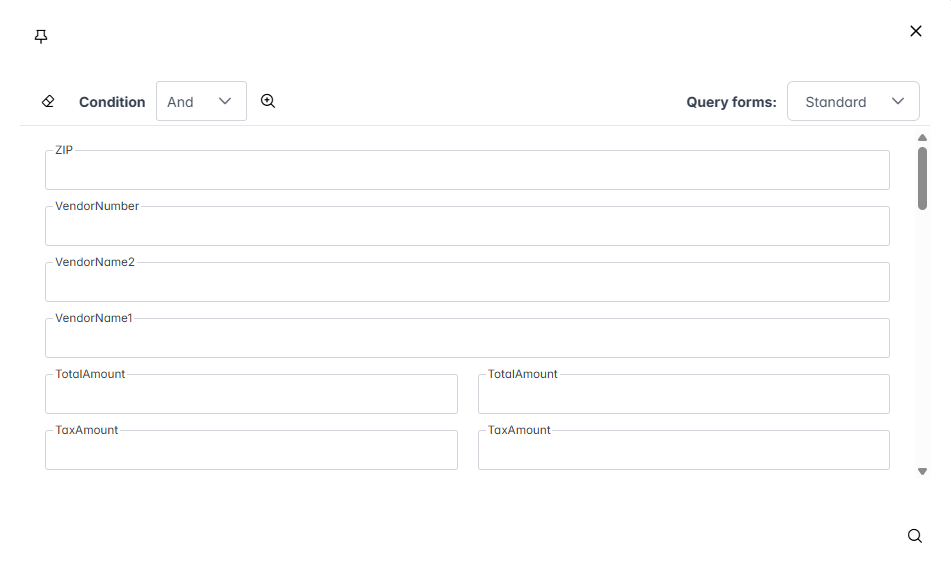
➣ A dialog with the index fields will open.
Notice
Index fields can be displayed directly below the full-text search field instead of in a dialog. To change index-field display, click on
 Minimize/maximize filter.
In the Condition drop-down list, select one of the following values:
And: All search values must apply to the search.Or: At least one search value must match the search.
If required, go to the Search forms drop-down list and select a pre-defined search form.
Notice
The search form controls which search fields are displayed. Search forms are defined by the administrator.
Enter data in the search fields.
Notice
When entering the search values, various options for the index field search are available.
Click on
 Search or press Enter.
➤ The index field search will be executed.
➤ The search results will appear in the hit list.