The "General" configuration node
The "Cache" configuration node
In the Cache configuration node, you can define which database is used for caching.
Property | Description |
|---|---|
ConnectionString | Connection string to the cache database |
ConsistencyCheck | If this property is activated, a consistency check will be carried out. |
DatabaseName | Database name |
DriverType | Cache database driver type |
Tenant | Tenant (optional) If no tenant is specified, the global cache database will be used. |
The "License" configuration node
The License configuration node displays the current license status. The License → CurrentLicense node displays your current license.
xSuite Archive Prism only works by way of volume licenses, not user models. The following values can be restricted for each license:
Number of archives
Number of documents in all archives
The restriction is checked when an attempt is made to create a new archive (number of archives) and when documents are inserted. The check only takes place once an hour, and the document quantities are not strictly limited. If the limit is exceeded by 10%, a warning will be issued in the log. It will then no longer be possible to create documents in this archive.
A license can also be issued for a specific major release and/or for a certain duration in days.
License data
The following properties are available in the License → CurrentLicense configuration node.
Feature | Type | Description |
|---|---|---|
MajorVersion | Number | Major version up to which the license is valid The value |
Customer | Text | Name of the customer for whom the license was issued |
MaxArchives | Number | Maximum number of archives. A The value |
MaxDocuments | Number | Number of documents in all archives The value |
Expires | Date | Date on which the license expires If no value is specified, this is indication that the license is valid indefinitely. |
Signature | Text | Signature |
License status
The following properties are available in the License → State configuration node.
Feature | Type | Description |
|---|---|---|
Archives | Number | List of all archives and the respective number of documents they contain |
Limitation not exceeded | Text | Maximum number of documents
|
Number of free archives | Number | Number of archives that may still be created (only relevant if the contract specifies limited archives) |
Time for counting documents | Number | Time taken by the server to determine the number of documents |
Version | Text | Version number of the installed software |
The "Log" configuration node
Notice
If you change logging settings, restart the web server and the archive service.
The xSuite Archive Server can write logs to various targets. By default, the log is written to a MongoDB database. You can view these log entries via the log.
All messages except debug messages are logged by default. You can activate the logging of debug messages for a defined period of time. To do this, enter a storage location for the log file in the Debug Folder field and an end date for debug logging in the Enable Debug Logging until field.
The output destinations of the log are defined via the logger. It is possible to use multiple loggers simultaneously, in which case they must be combined via a composite logger.
The following standard loggers are available:
Logger | Description |
|---|---|
ConsoleLogger | Writes to the console This logger is not useful for a server application but can be helpful for command line tools. It is not active by default. |
FileLogger | Writes to a file This logger is not active by default. |
MongoDbLogger | Writes to a MongoDB database This logger is active by default and, among other things, logs the audit trail. |
CompositeLogger
The CompositeLogger has the global log settings and distributes the log entries across the individual loggers.
Feature | Type | Default value | Description |
|---|---|---|---|
Description | String |
| Short description of the logger |
IsInternalLoggingEnabled | Bool |
| Internal logging of the logger turned on. |
LoggerFactoryType | String |
| Fully qualified name of the factory class which generates instances of the type ILog. |
LogThreshold | String | All | Log level |
MaxSize | Integer |
| Max. size of log for log files, etc. |
Name | String |
| Name of logger |
ShowLogName | Bool |
| Displays the log source in formatted log entries. |
ShowLogThreshold | Bool |
| Displays the log level in formatted log entries. |
ShowTimestamp | Bool |
| Displays the log level in formatted log entries. |
Tenant | String | If set, log entries are written to the respective tenant log. For standard behavior, do not set this. | |
TimeStampFormat | String |
| Time stamp format |
ChildLogger | Array | Assigned logger |
ConsoleLogger
The ConsoleLogger is a logger that outputs the log entries in the output window for the tools. In the pre-settings, this logger is turned off.
Feature | Type | Default value | Description |
|---|---|---|---|
Description | String |
| Short description of the logger |
IsInternalLoggingEnabled | Bool |
| Internal logging of the logger turned on. |
LoggerFactoryType | String |
| Fully qualified name of the factory class which generates instances of the type ILog |
LogThreshold | String |
| Log level |
Name | String |
| Name of logger |
ShowLogName | Bool |
| Displays the log source in formatted log entries. |
ShowLogThreshold | Bool |
| Displays the log level in formatted log entries. |
ShowTimestamp | Bool |
| Displays the time stamp in formatted log entries. |
Tenant | String | If set, log entries are written to the respective tenant log. For standard behavior, do not set this. | |
TimeStampFormat | String |
| Time stamp format |
Filters | Array | Assigned filter |
FileLogger
The FileLogger writes log output to files.
Feature | Type | Default value | Description |
|---|---|---|---|
Description | String |
| Short description of the logger |
IsInternalLoggingEnabled | Bool |
| Internal logging of the logger turned on. |
LoggerFactoryType | String |
| Fully qualified name of the factory class |
LogThreshold | String |
| Log level |
Name | String |
| Name of logger |
MaxSize | Integer |
| Max. Size of the log file |
Path | String |
| Path for log files |
Pattern | String |
| Mask for file name. Placeholder: 0 = Date 1= Log source 2 = Log level 3 = Action 4 = Tenant 5 = Tracking key |
ShowLogName | Bool |
| Displays log source in log entries. |
ShowLogThreshold | Bool |
| Displays log levels in log entries. |
ShowTimestamp | Bool |
| Displays time stamp in entries. |
Tenant | String | If set, log entries are written to the respective tenant log. | |
TimeStampFormat | String |
| Time stamp format |
Filters | Array | Assigned filter |
MongoDbLogger
This logger writes log entries to a MongoDB.
Feature | Type | Default value | Description |
|---|---|---|---|
Description | String |
| Short description of the logger |
IsInternalLoggingEnabled | Bool |
| Internal logging of the logger turned on. |
LoggerFactoryType | String |
| Fully qualified name of the factory class which generates instances of the type ILog |
LogThreshold | String |
| Log level |
Name | String |
| Name of logger |
ConnectionString | String |
| Connection string for MongoDB |
Database Name | String |
| Database name |
ShowLogName | Bool |
| Displays the log source in formatted log entries. |
ShowLogThreshold | Bool |
| Displays the log level in formatted log entries. |
ShowTimestamp | Bool |
| Displays the time stamp in formatted log entries. |
Tenant | String | If set, log entries are written to the respective tenant log. For standard behavior, do not set this. | |
TimeStampFormat | String |
| Time stamp format |
Filters | Array | Assigned filter |
Debug Expressions
If debug output is required, you can activate the FileLogger. This is configured on delivery so that it creates files that are, after C:\Temp, a maximum of 5 MB in size which only contain debug and trace messages.
Notice
Debug outputs are extensive and can quickly fill up the configured drive. Do not switch on the debug outputs outside the required period of time.
Notice
You can also output debug messages directly in the configuration node Log configuration node.
To turn on the FileLogger, de-select the property Enabled for NullLogerFilter in the FileLogger. It is located under /Log/Config → Logger/ChildLogger. Switching it on does not affect processes immediately. If you wish to have an immediate effect, start the archive services.
To turn off the FileLogger, select the property Enabled for NullLogerFilter in the FileLogger. It is located under /Log/Config → Logger/ChildLogger. Switching it on does not affect processes immediately. If you wish to have an immediate effect, start the archive services.
Filter
Filters set limits to the output of log entries. The NullLogerFilter is a special case: It filters out all log outputs for a logger and can be used as an on/off switch. This is turned off for all loggers besides the FileLogger in delivery settings. At the moment, the following filters can be used:
Name | Purpose/Effect |
|---|---|
NullLoggerFilter | Suppresses all log outputs. |
ThresholdRangeLoggerFilter | Filters for specific log levels (from-to). |
StringMatchLoggerFilter | Filters for specific strings in log entries (notification text). |
TenantMatchLoggerFilter | Filters for log outputs for a specific tenant. |
ActionMatchLoggerFilter | Filters for the beginning of the name of actions. |
TrackingKeyMatchLoggerFilter | Filters for the beginning of a tracking key. |
NullLoggerFilter
Feature | Type | Default value | Description |
|---|---|---|---|
Description | String |
| Short description of the logger filter |
LoggerFilterType | String |
| Fully qualified name of the type |
Name | String |
| Name of logger filter |
Enabled | Bool |
| Turned on or off. |
ThresholdRangeLoggerFilter
Feature | Type | Default value | Description |
|---|---|---|---|
Description | String |
| Short description of the logger filter |
LoggerFilterType | String |
| Fully qualified name of the type |
Name | String |
| Name of logger filter |
AcceptOnMatch | Bool |
| If |
Enabled | Bool |
| Turned on or off. |
ThresholdMin | String |
| Minimal log level |
ThresholdMax | String |
| Maximal log level |
StringMatchLoggerFilter
Feature | Type | Default value | Description |
|---|---|---|---|
Description | String |
| Short description of the logger filter |
LoggerFilterType | String |
| Fully qualified name of the type |
Name | String |
| Name of logger filter |
AcceptOnMatch | Bool |
| If |
StringToMatch | String | String used for filtering | |
RegexToMatch | String | Regular expression for filtering |
TenantMatchLoggerFilter
Feature | Type | Default value | Description |
|---|---|---|---|
Description | String |
| Short description of the logger filter |
LoggerFilterType | String |
| Fully qualified name of the type |
Name | String |
| Name of logger filter |
AcceptOnMatch | Bool |
| If true, log outputs will be filtered according to the specified TenantToMatch. If False, the respective matching entries will not be output. |
TenantToMatch | String | Tenant for filtering |
ActionMatchLoggerFilter
Feature | Type | Default value | Description |
|---|---|---|---|
Description | String |
| Short description of the logger filter |
LoggerFilterType | String |
| Fully qualified name of the type |
Name | String |
| Name of logger filter |
AcceptOnMatch | Bool |
| If |
ActionToMatch | String | Beginning of the name of the action used for filtering. |
TrackingKeyMatchLoggerFilter
Feature | Type | Default value | Description |
|---|---|---|---|
Description | String |
| Short description of the logger filter |
LoggerFilterType | String |
| Fully qualified name of the type |
Name | String |
| Name of logger filter |
AcceptOnMatch | Bool |
| If |
TrackingKeyToMatch | String | Beginning of the tracking key for filtering |
The "SystemSettings" configuration node
The "System Settings" are basic system settings for subordinate systems within xSuite Archive Prism.
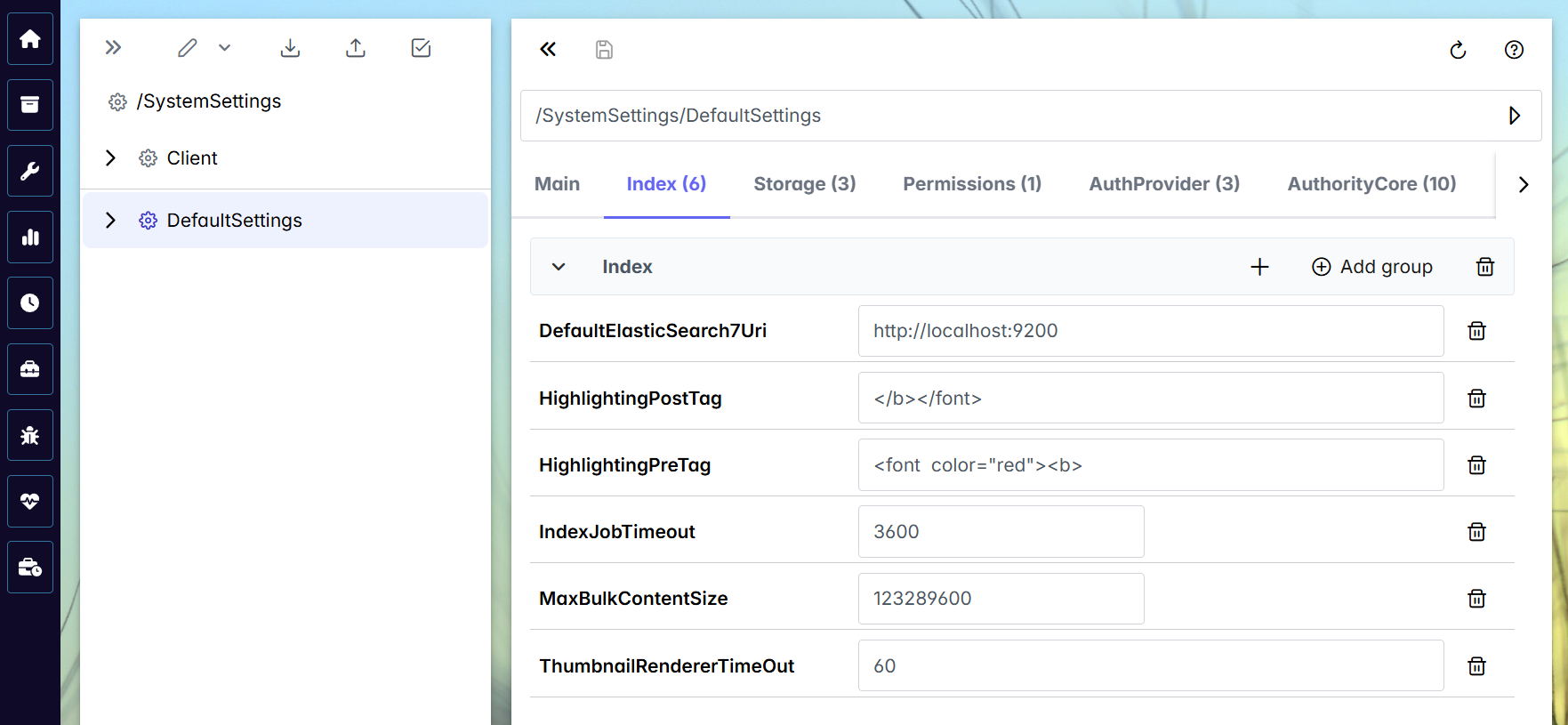
Various areas of system settings can be called up via the tabs in DefaultSettings.
 |
Index
The Index tab is where settings can be made for indexing.
Property | Type | Description |
|---|---|---|
DefaultElasticSearchUri | Text | Standard URI for Elasticsearch This URI might also contain credentials in unencrypted and encrypted form. |
HighlightingPostTag | Text | HTML code that ends highlighting. Example: Ends highlighting as prefixed in the example for PreTag. |
HighlightingPostTag | Text | HTML code that initiates highlighting Example: This example creates highlighting in bold, red font. |
IndexJobTimeout | Number | Time in seconds that the index job waits for a response from Elasticsearch |
MaxBulkContentSize | Number | Maximum size of a batch of indexes for Elasticsearch This value corresponds to the setting in http.max_content_length: We recommend setting the MaxBulkContentSize to half the size. |
Storage
The Storage tab is where settings can be made for the storage area.
Property | Type | Description |
|---|---|---|
CheckHashOnLoad | Yes/No | When loading a document within the client, the hash is checked and a notification is output. Default settings will not trigger this. |
StorageCacheTime | Number | Time in the number of minutes that the storage keeps an archive, index, etc. in the cache |
Permissions
The Permissions tab is where settings can be made for authorizations.
Property | Type | Description |
|---|---|---|
PermissionCacheTime | Number | Time in the number of minutes that the server keeps authorizations in the cache |
AuthProvider
The AuthProvider tab is where settings can be made for roles and proxy servers.
Notice
The settings are already preset in setup. Do not change these settings unless there is a support problem.
Property | Type | Description |
|---|---|---|
AllowedProxies | Text | Comma-separated list of proxy server names trusted by the archive server |
RoleProvider | Text | .NET class that provides the server with the roles |
RolesCacheTime | Number | Time in the number of minutes that the server caches roles |
AuthorityCore
The AuthorityCore tab is where settings can be made for the xSuite Authority Core.
Notice
The settings are already preset in setup. Do not change these settings unless there is a support problem.
Property | Type | Description |
|---|---|---|
ApplicationName | Text | Name of the application for the roles |
AuthType | Text | Authorization type The Basic type is always used. |
CustomerKey | Text | The customer that is stored in xSuite Encore Prism |
ServiceURL | Text | The service URL of the xSuite server |
ServiceUserDomain | Text | Domain |
ServiceUserName | Text | Service user name |
ServiceUserPassword | Text | Service user password |
TenantKey | Text | The tenant that is stored in xSuite Encore Prism |
TenantMap | Text | Composed of TenantKey and CustomerKey: NoticexSuite Encore Prism recognizes customers and tenants that are technically separate from each other. As xSuite Archive Prism only recognizes tenants, each combination is treated as an xSuite Archive tenant in xSuite Archive Prism. |
TempFiles
The TempFiles tab is where settings can be made for temporary files.
Property | Type | Description |
|---|---|---|
TemporaryFolder | Text | Folder for managing temporary files, either existing or to be created. Is also removed from the server again. If this value is not set correctly, the files will be kept in the temp directory and will not be cleaned up. |
MaxMemSizeStream | Number | This indicates the volume of files that the server does not create in the temp directory but keeps in memory. The unit is bytes. |
Locking
The Locking tab is where settings can be made for locking objects.
Property | Type | Description |
|---|---|---|
LockExpire | Number | The number of seconds waited before a repeated release of a requested lock is triggered. This is for the case that the process itself has not triggered the release. |
LockTimeOut | Number | The number of milliseconds waited for a lock to be released |
Reporting
The Reporting tab is where settings can be made for sending import job notifications by email.
Property | Type | Description |
|---|---|---|
SmtpHost | Text | SMTP server for sending e-mails |
SmtpPort | Number | SMTP port number |
SmptUser | Text | User for email dispatch |
SmtpPassword | Text | Password for the user of the email dispatch |
ReportSender | Text | Sender |
ReportRecipient | Text | Recipient |
IndexJobManager
The IndexJobManager tab is where settings can be made for asynchronous indexing.
Property | Type | Description |
|---|---|---|
Collection | Text | MongoDB collection for index jobs (asynchronous indexing) |
Database | Text | MongoDB database for index jobs (asynchronous indexing) |
Translation
The Translation tab is where settings can be made for the translations in the system.
Property | Type | Description |
|---|---|---|
SystemLanguage | Text | Internal system language for logging |
Security
The Security tab is where security settings can be made.
Property | Type | Description |
|---|---|---|
Salted | Yes/No | Controls whether user role passwords are provided with a salt. |
Replica
The Replica tab is where settings can be made for replication.
Property | Type | Description |
|---|---|---|
Collection | Text | The MongoDB-Collection in which ReplicaJobs are managed |
Database | Text | The MongoDB database in which ReplicaJobs are managed |
Directories | Text | Directory in the file system in which replication data still to be written to the local archive is managed |
ForeignDirectory | Text | Directory in the file system, for managing replication data that has been transferred from another server for replication |
ReplicaActionTimeout | Number | The number of seconds for which the execution of a replica job is blocked |
Monitoring
The Monitoring tab is where settings can be made for monitoring and logging.
Notice
The results of the monitoring are displayed in the Archive Monitor.
Property | Type | Description |
|---|---|---|
ArchiveStorageController | Yes/No | For logging the interaction between the archive databases (administration, versioning, and notes) and the actual repository |
ArchiveStorageDriver | Yes/No | For logging the actions in the actual archive repository |
Indexer | Yes/No | For logging the indexing |
Searcher | Yes/No | For logging actions using the search functions. |
SAP
The SAP tab is where settings can be made for SAP.
Property | Type | Description |
|---|---|---|
CertCacheTime | Number | Time in the number of minutes that certificates are cached |