Document view
In the document view, you can view the document data and the document attachments. If you have opened a document, the document will appear in the document view. You can perform various actions for the document.
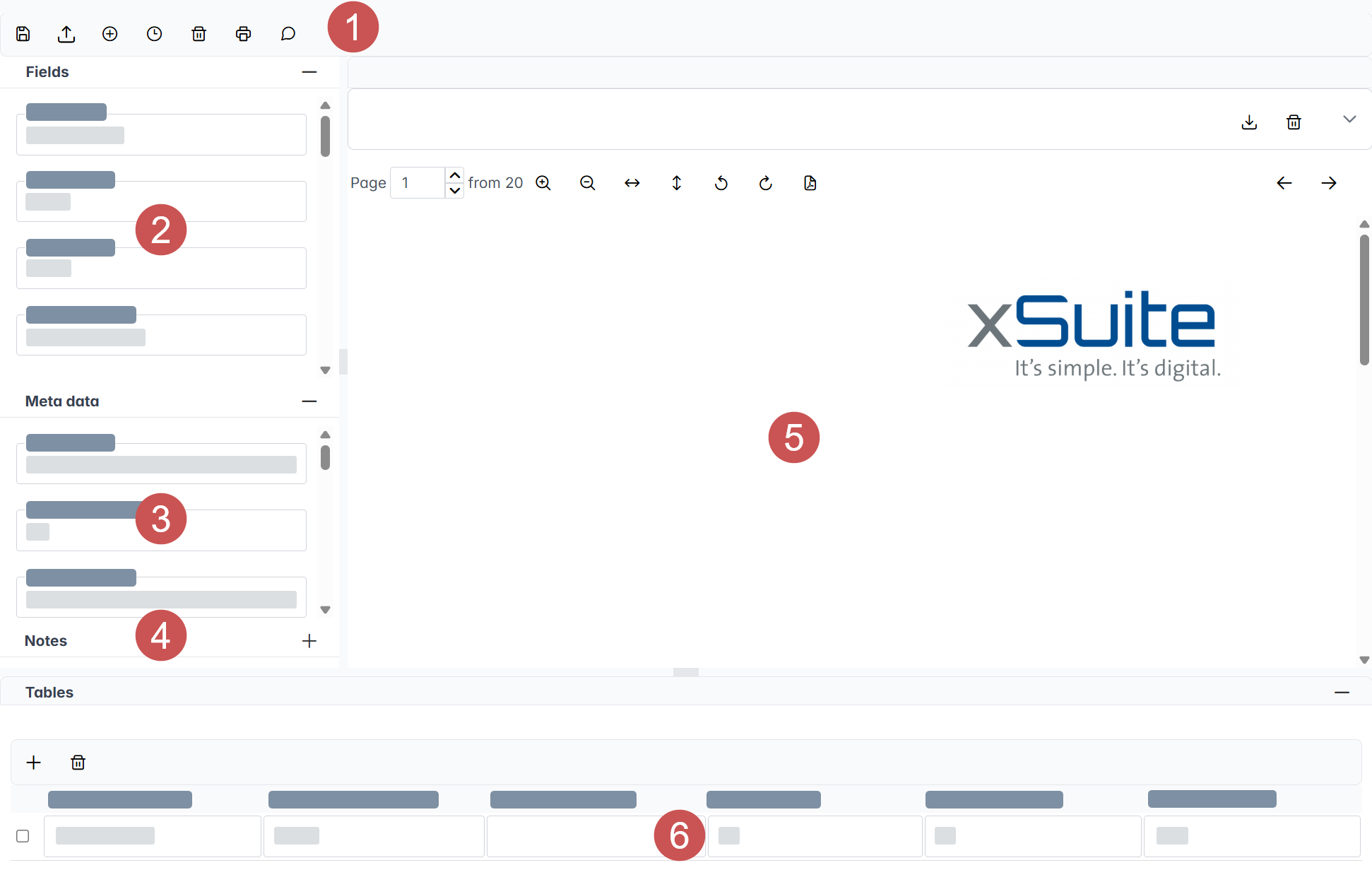
The document view consists of the following elements:
 |
Element | Description | ||||||||||||||||||||||
|---|---|---|---|---|---|---|---|---|---|---|---|---|---|---|---|---|---|---|---|---|---|---|---|
1 | Buttons | The buttons in the document view enable various actions to be performed on a docuemnt. The following buttons are available:
| |||||||||||||||||||||
2 | Fields | The document's index fields are displayed under Fields. With the buttons, you can add new fields. | |||||||||||||||||||||
3 | Metadata | The document's metadata is displayed under Meta data. | |||||||||||||||||||||
4 | Notes | The document notes are displayed under Notes. You can add a note using the buttons. | |||||||||||||||||||||
5 | Viewer | The attachments of a document are displayed in the viewer. If a document has no attachments, the viewer will be hidden. | |||||||||||||||||||||
6 | Tables | The tables in the document (e.g., the item data) are displayed under Tables. | |||||||||||||||||||||


