"Item Details" Screen: Main Overview in SAP Fiori
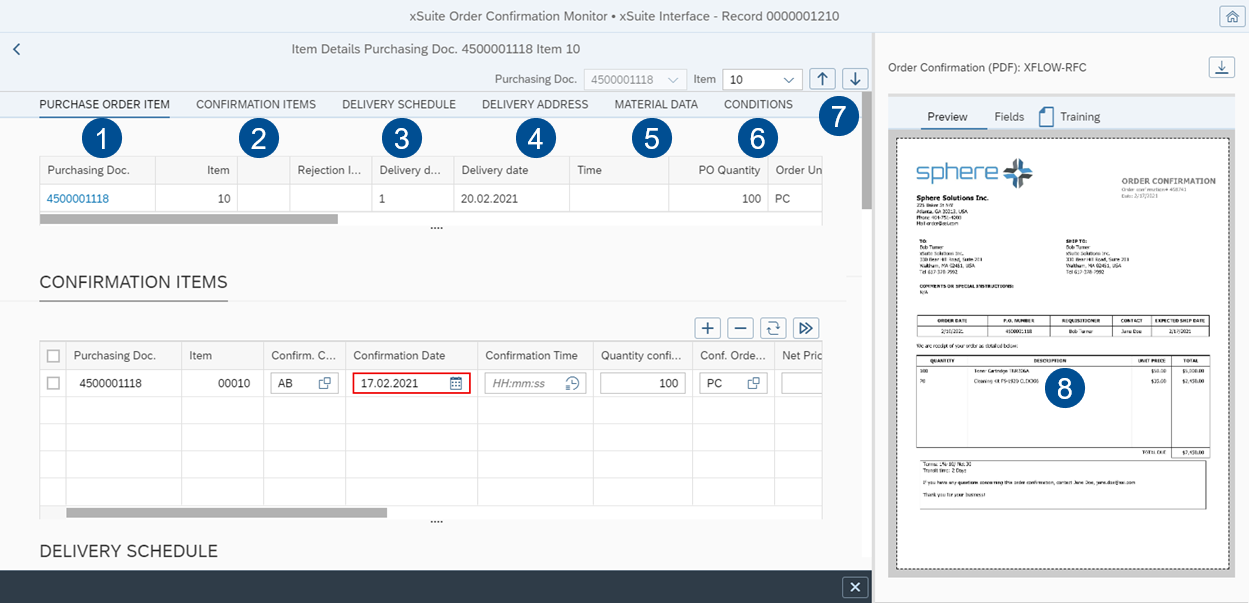
Area | Information and comments | |
|---|---|---|
1 | Purchase Order Item | Shows the information on a selected PO item. The information is used for direct comparison with the associated confirmation items. |
2 | Confirmation Items | Shows the confirmation items of the selected PO item. You can edit confirmation items in validation mode. The system will highlight faulty data fields in red (error) or yellow (warning). For information on the buttons in the confirmation item, see Validation: Buttons for Confirmation Items. |
3 | Delivery Schedule | Shows the delivery schedule of the PO item. |
4 | Delivery Address | Shows the delivery address from the PO item. |
5 | Material Data | Shows the material data from the PO item. |
6 | Conditions | Shows the conditions from the PO item. |
7 | Buttons for items |
The drop-down box next to the buttons shows the number of the item that is currently displayed. You can select an item from the purchase document using the drop-down box. |
8 | Image display | This is where the image of the document is displayed. |

