Validation: Main Overview in SAP Fiori
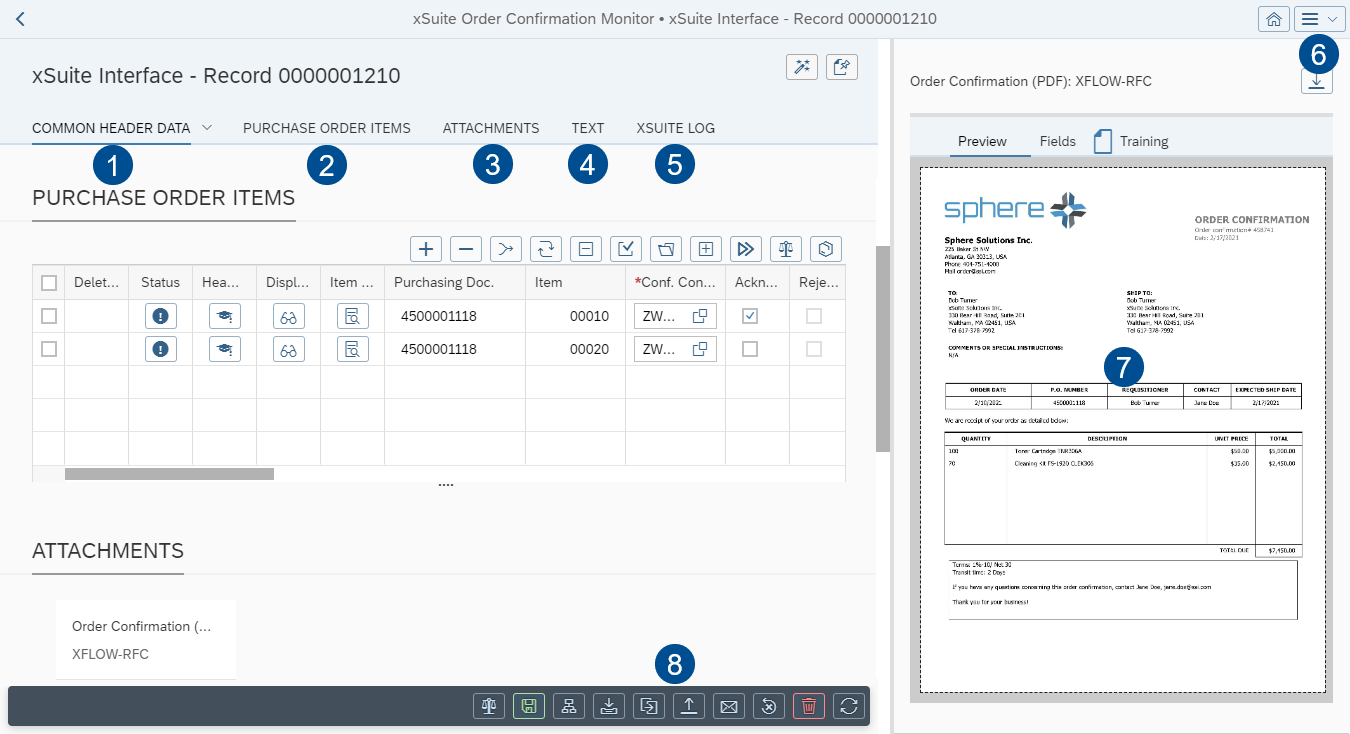
Section | Information and comments | |
|---|---|---|
1 | Common Header Data | |
2 | Purchase Order Items | This is where you can view the PO items of a document. For more information on PO items, see: A PO item may contain multiple confirmation items. Confirmation items are editable in a separate view. For more information, see "Item Details" Screen: Main Overview in SAP Fiori. |
3 | Attachments | The document is displayed in xSuite Viewer. For information on the xSuite Viewer, see Working with the xSuite Viewer. All other attachments are displayed in a simple page view. |
4 | Text | |
5 | xSuite Log | |
6 | Settings | Here, you can define how documents are displayed (Settings → Global → Document display):
|
7 | Viewer | This is where the image and other attachments to the document are displayed. The image of the document is displayed in the xSuite Viewer or in the PNG Viewer. All other attachments are displayed in a simple page view. For information on the xSuite Viewer, see xSuite Viewer in SAP Fiori. For information on the PNG Viewer, see The PNG Viewer in SAP Fiori. |
8 | Document buttons | |