Opening the Invoice Overview
Opening the Invoice Overview in the SAP GUI
Call transaction /WMD/XF_IV_ADMIN.
➣ The selection screen will open.
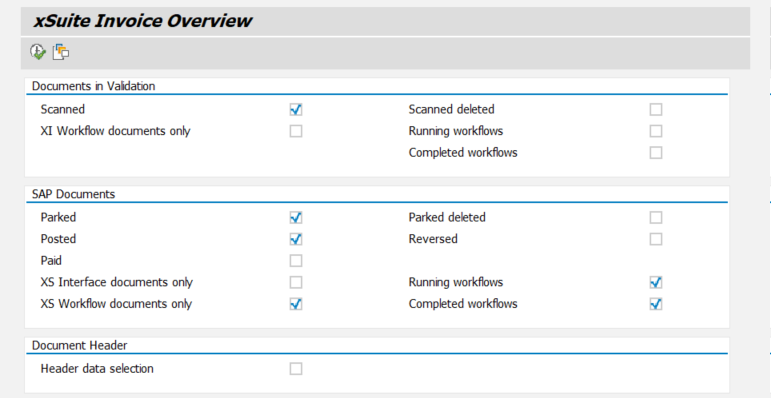
Enter search terms in the search fields as needed.
For information on search fields, see Invoice Overview: Search Fields.
Click the
 Execute button or press F8.
➤ The Invoice Overview will open.
Opening the Invoice Overview in xSuite Web
Open the xSuite Web Business Workplace.
Click the button Back to dashboard.
➣ Your dashboard will open.
Click on the Invoice Overview tile.
➤ The Invoice Overview will open.
Opening the Invoice Overview in SAP Fiori
Open the SAP Fiori start page.
Click on the Invoice Overview tile.
➣ The search field will open.
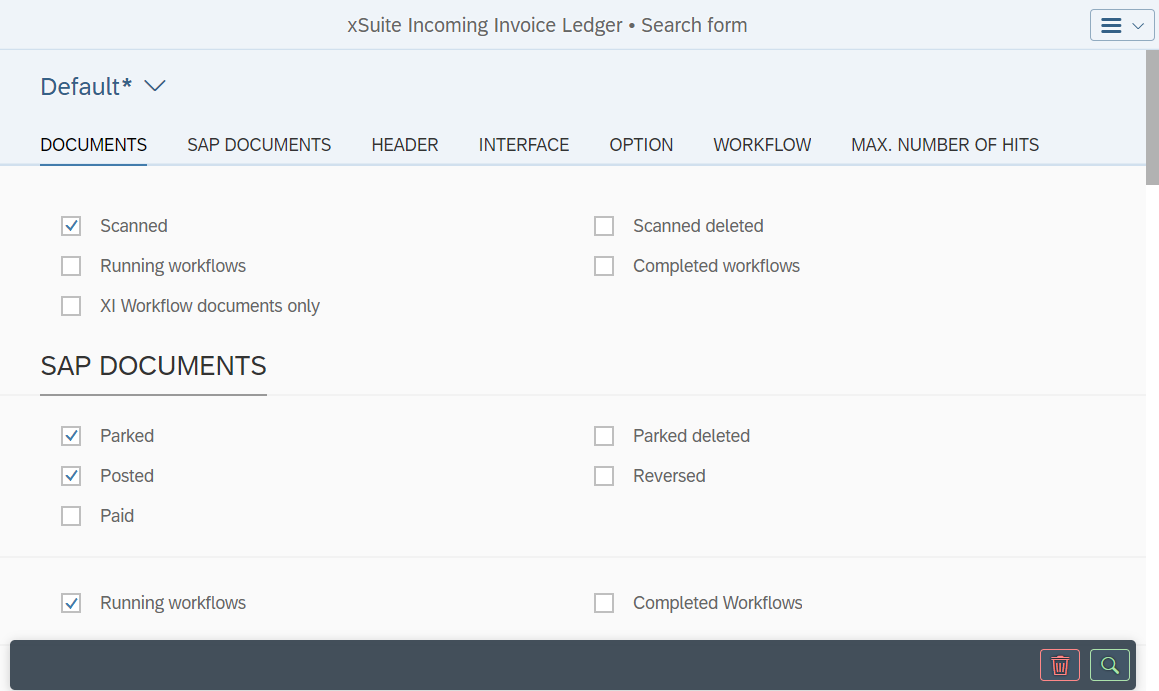
Proceed with one of the following steps.
Enter search criteria and click the
 Search button.
➤ The hit list will open. The documents that appear here all correspond to your search criteria.
For information on search fields, see Invoice Overview: Search Fields.
Notice
The search criteria you have entered can be saved as a view. The data of existing views can be loaded.
For more information, see Views in SAP Fiori.
Click the
 Search button.
➤ The hit list will open. All documents will appear.