May 2026
The xSuite Invoice Sphere Release Notes for the May 2026 deployment describe the product features that have been added or changed since the last deployment.
Notice
Note the post-deployment tasks for a new version.
Caution
If you have previously made manual changes to the translations of the SCB indicators, you will need to make those changes again. After deployment, the changes will no longer be present.
For more information, see Bug Fixes ("Existing translations for SCB indicators are not displayed ").
General Information
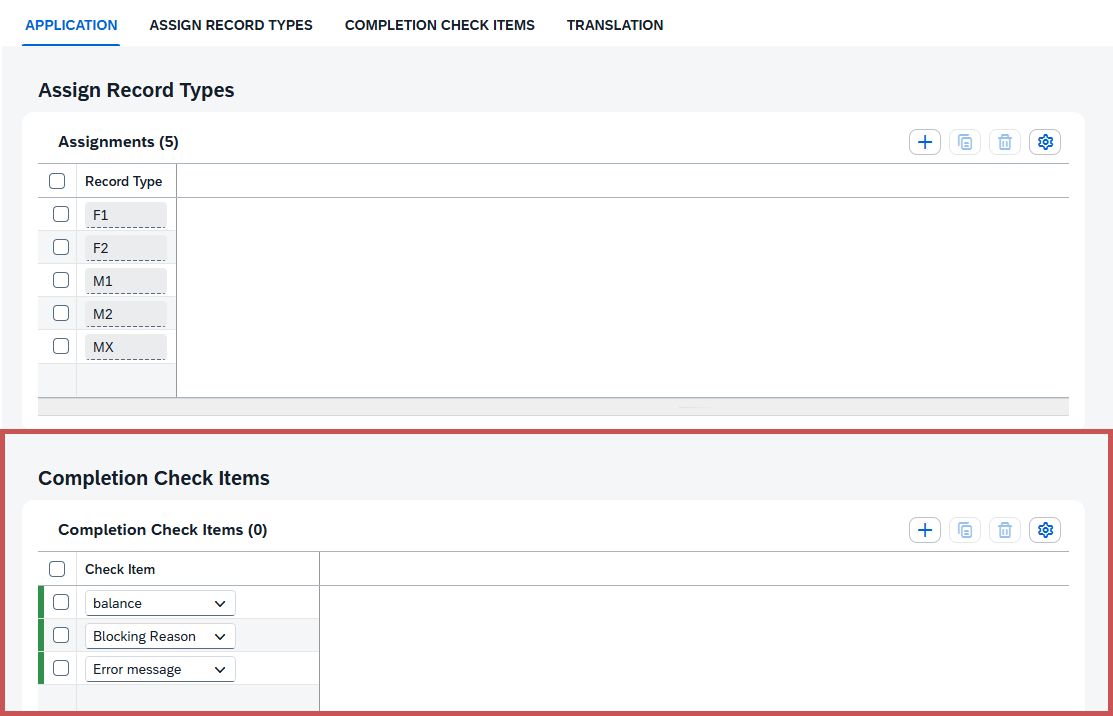
Since the March 2026 deployment, the new Completion Check Items section has been available in the application configuration in Invoice Monitor Customizing.
By activating the check items, you specify the criteria against which the document will be checked by the automatic background check. If the relevant criteria are not met, the document is routed to the "Completion" workflow task.
 |
Caution
If you use the workflow with automatic background checking, you must enable at least one check item for automatic background checking. Otherwise, the workflow cannot be started.
Notice
If you are using the default workflow, you do not need to make any entries here. You are using the default workflow if you have selected Sphere Workflow Normal in the Workflow Template ID field in the application's detail view.
New Features
New languages available
The entire user interface of xSuite Invoice Sphere is now also available in the following languages:
Danish
Dutch
Spanish
French
New file formats for attachments
Previously, only PDF files could be uploaded. Now you can upload files in any format.
XLSX
DOCX
PNG
JPG
CSV
XML
Deployment announcement as pop-up notification
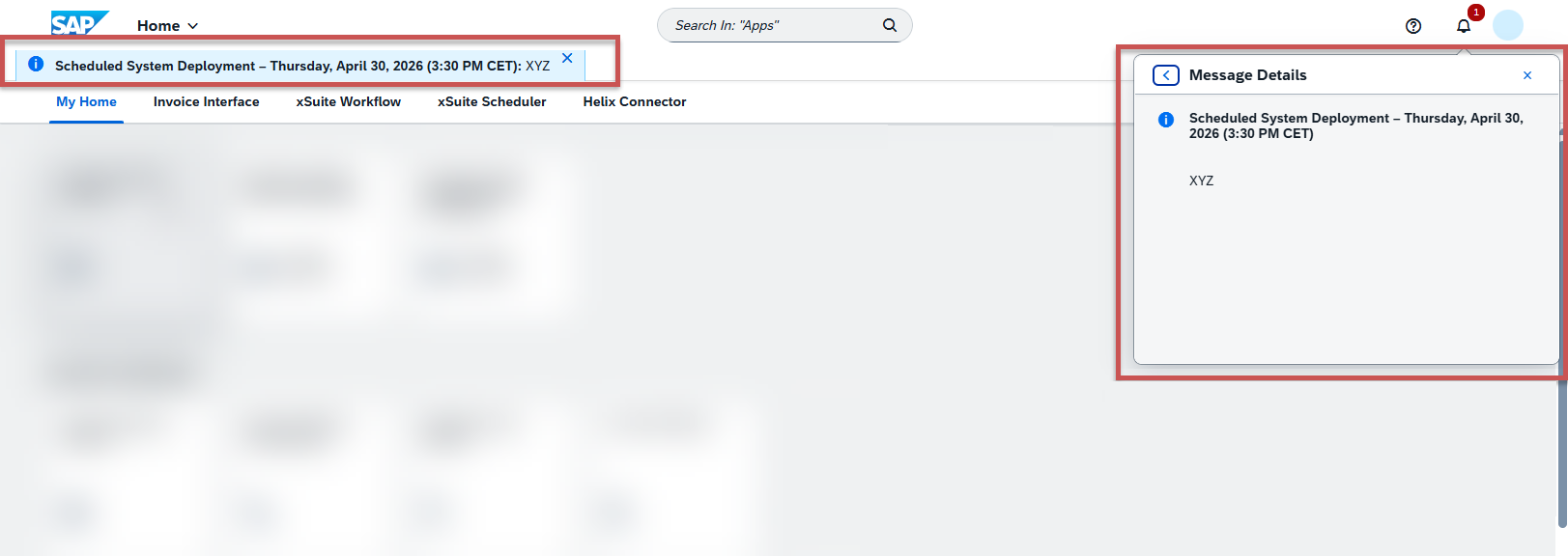
Notifications about upcoming deployments will now appear as pop-up notifications directly in the user interface. The notification includes the date and time, as well as the estimated duration of the deployment. In addition, the notification will appear as a banner at the top of the page.
New determination type in Workflow Agent Determination
In the Worfklow Agent Determination, the new determination type
Project Manageris available, which allows you to select the person responsible for the WBS element. This feature is currently only available for FI documents.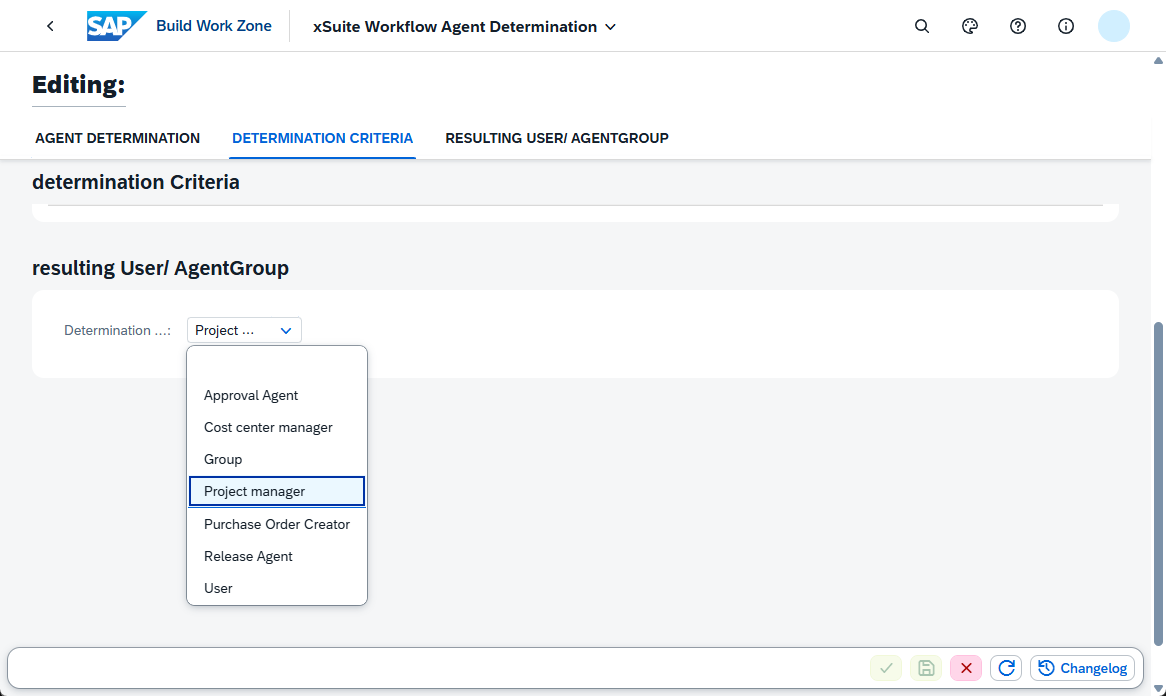
Bug Fixes
Bug number | Description |
|---|---|
2028 | Calculating the payment due date Until now, the payment due date calculation was triggered only when the payment terms or the posting date were changed. Changes to the payment baseline date are now also taken into account when calculating the payment due date. |
2022 | HANA DB Connection Pool exceeded / Indexserver alert has reached the maximum allowed external connection of 2000 The production HANA database had previously been configured to allow only 2,000 concurrent connections. Once connections were established, they were not closed, so this limit was quickly reached. This issue has been resolved. The "Invoice Report," "Scheduler," "Helix Connector," and "Workflow" applications have been switched from "one pool per tenant" to "one pool per database." The Invoice Monitor remains configured as "one pool per tenant." |
2012 | The selection dialog / filter based on the business partner description in the agent selection does not work correctly In the Workflow Agent Determination, when filtering by a determination criteria in the F4 help, only the input of the full business partner name was supported. Entering part of the name yielded no results. This issue has been resolved. The search parameters "equals," "contains," "starts with," and "ends with" are now supported. |
2002 | Helix Connector: Writing to the invoice application log fails Writing to the application log failed, and the actual cause of the error could no longer be traced. This issue has been resolved. |
1998 | Some suppliers are no longer available in the Business Partner field, even though they definitely exist When retrieving the business partners from the backend, a URL was generated that exceeded the maximum allowed length. The process for retrieving business partners has been updated and now occurs in multiple batches. All available business partners are displayed. |
1980 | The document is not marked as "posted" even though it has been posted successfully After documents were successfully posted, they were not marked as "posted." This was due to an error in the processing of attachments. This issue has been resolved. |
1959 | Error result Empty srv.monitor event create, due to missing translation in record type A missing translation in the record type caused an error message and the action to be aborted. This has been fixed. The action is no longer dependent on the translation in the record type. |
1920 | In Invoice Monitor there is a need to display the accounting element WBS-element for an LO invoice record to the assigned purchase order In the Invoice Monitor Customizing, the field control for account assignment has been updated. For account assignment types "U" and "X," you can now specify whether and how the fields are displayed ( |
-- | Derivation of cost center manager fails The derivation of the cost center manager failed when the profit center was specified. This has been fixed. |
-- | Description of the SCB indicator in Customizing is not language-dependent The default language for the description of the SCB indicator has been changed from German to English. |
-- | In the Workflow Task Report, the technical names of the values were displayed in the value help. This has been corrected so that the correct names are now displayed in all languages. |
-- | Error message when uploading via the Helix Connector When uploading an invoice via the Helix Connector, the process fails if temporary storage of attachments is configured for xSuite Archive Helix but no external archive has been specified. This was not indicated in the error message. The corresponding error message has been updated to indicate that the issue is due to a missing configuration. |
-- | Existing translations for SCB indicators are not displayed When editing the data for an SCB indicator in Invoice Monitor Customizing, no data was displayed in the Translation section, even though it was available in the backend. This issue has been resolved, and the existing translations are now displayed. CautionIf you have previously made manual changes to the translations of the SCB indicators, you will need to make those changes again. After deployment, the changes will no longer be present. |
-- | Line Item Report/Workflow Task Report: New views are not displayed immediately In the Line Item Report and Workflow Task Report tiles, newly saved views were not immediately displayed in the list of saved views. This issue has been resolved, and new views now appear immediately in the list. |
-- | Incorrect translation of "WBS element" In the English user interface, the German term PSP Element was incorrectly displayed in the Invoice Monitor and the Line Item Report. The correct English translation WBS element is now displayed. |
-- | Invoice Monitor: Error when posting "M9" invoices Posting invoices with the record type "M9" ("MX" invoice) failed if the invoice contained at least one AS line item and, at the same time, a purchase order line item and/or a G/L line item. Posting now works correctly. |
-- | Application with an empty destination results in an error If no destination was specified for an application, this caused an error in the Workflow Task Report when filtering by recipient. If the destination is not specified, this is now ignored when loading the workflow task report data and no longer causes this error. |
-- | Invoice Monitor: Missing button when editing "M9" invoices When editing an invoice with the record type "M9" ("MX" invoice), the button This issue has been resolved, and the button now displays after the draft has been activated. |
-- | Invoice Monitor: Incorrect additional error message after specifying a non-existent partner bank type When creating an invoice, an incorrect error message was displayed if a valid business partner was entered along with a non-existent bank partner type. The incorrect error message stated that the business partner did not exist, even though it was valid and present in the system. This issue has been resolved. A correct error message is now displayed, indicating that the partner bank type does not exist. |
-- | Helix Connector: Conveyor token has expired If the Conveyor token expires while retrieving invoices from xSuite Helix, causing the response to the xSuite Helix tenant to fail, processing is aborted. This behavior has been corrected. When the conveyor token expires, a new token is created to continue processing. |
-- | Helix Connector does not take the validity of the cost center into account The Helix Connector now takes the validity of cost centers into account. |
-- | Invoice Monitor Customizing: VAT is not displayed In the Customizing settings for tax codes, no value was displayed in the VAT field in the detail view, even though it was visible in the tax code overview. This issue has been resolved. The value in the VAT field is now displayed correctly in the detail view. |
-- | Workflow for FI invoices fails when the purchasing group is used as a criterion If a purchasing group was defined as a criterion in the Workflow Task Configuration or in the Workflow Agent Determination, the workflow would fail for FI invoices that did not have a purchasing group. The logic of the Workflow Agent Determination has been adjusted so that the absence of a purchasing group no longer causes the workflow to terminate. |
-- | My Expert Inbox: Forwarding to valid users fails When attempting to forward a work item via the My Expert Inbox, the system incorrectly rejected authorized workflow users and aborted the forwarding process. The system was searching for the user ID in the wrong column. This issue has been resolved, and forwarding now works correctly. |
-- | Incorrect validation of required fields in Workflow Agent Determination In the Workflow Agent Determination, after saving the entries, an error message appeared stating that both the User ID field and the Group ID field must be filled in. This has been corrected. Only one of the two fields needs to be filled in. |
