Assigning a tile catalog or tile group to a role
You can control access to the tiles included in a tile catalog or tile group by assigning these catalogs and groups to roles. For more information, see Configuring authorizations for tiles.
Execute the transaction PFCG.
Select the preferred role.
Select the Menu tab.
Open the context menu for the Transaction button.
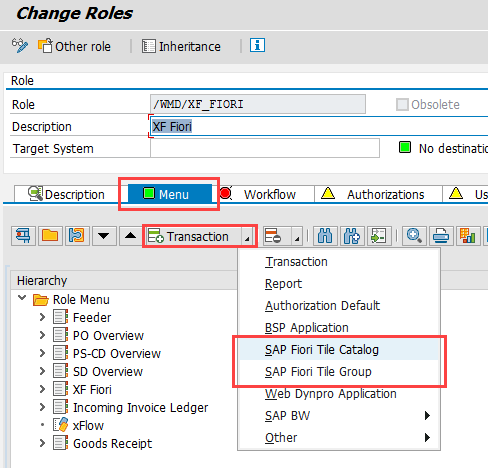
Proceed with one of the following steps.
To assign a tile catalog to the role, select the entry SAP Fiori Tile Catalog. In the dialog that appears, enter the ID of the preferred tile catalog.
To assign a tile group to the role, select the entry SAP Fiori Tile Group. In the dialog that appears, enter the ID of the preferred tile group.